Detected across 3 feedback sources
Review feedbackYour everyday  product companion
Surveys, a feedback board, releases and store reviews in one Swift package. Your team works every answer from one dashboard.
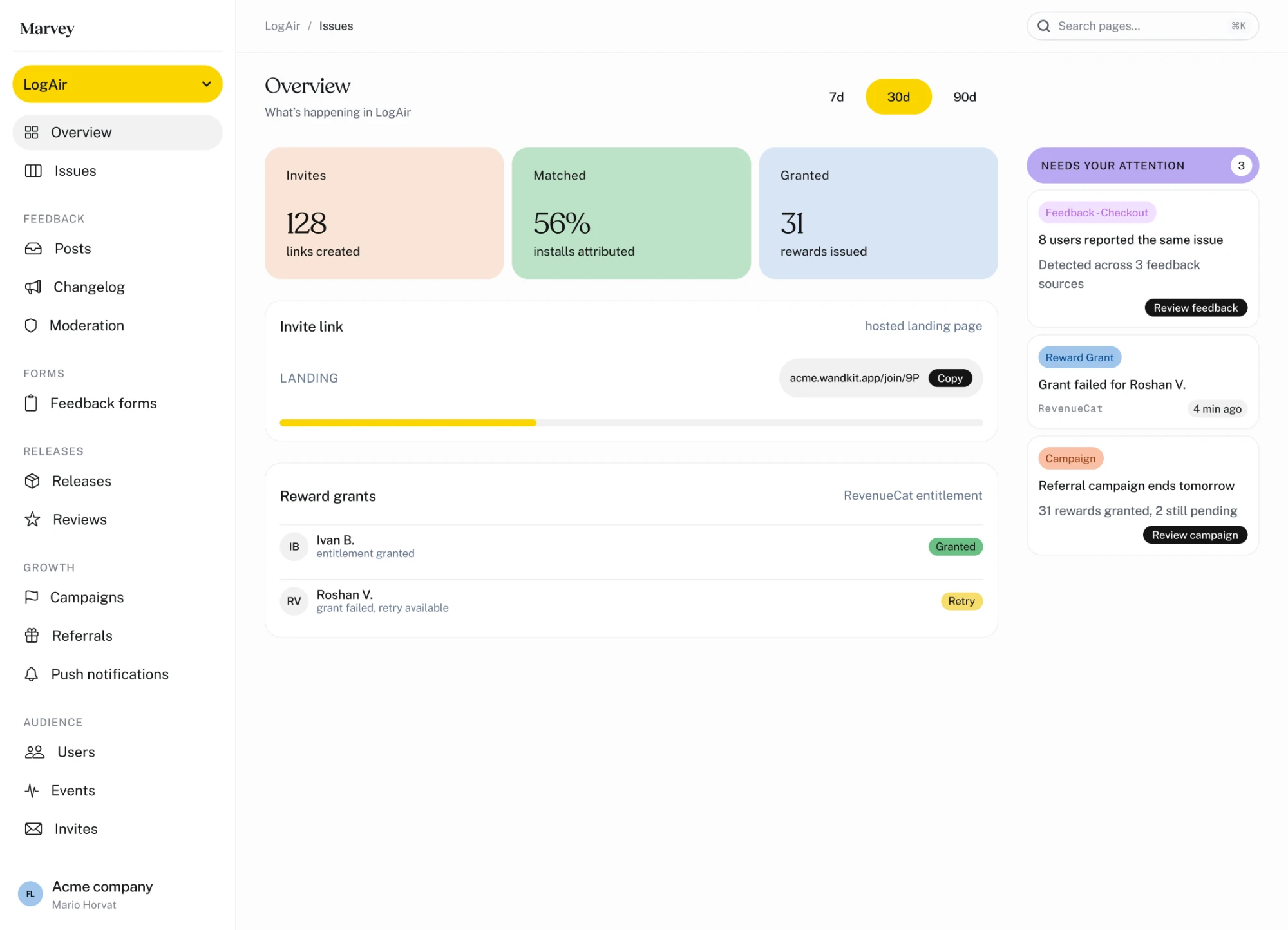



The Marvey dashboard: an overview of invites, installs attributed and rewards issued, an invite link, reward grants from RevenueCat, and a column of items that need your attention.
Everything users
tell you, in one place.
Survey answers, feature requests, bug reports and store reviews stop living in five different tools.
Ask on the event,
not on open.Send an event you already track. Marvey decides whether a survey shows, and which one.

One inbox,
one triage.Answers, posts and bug reports land in one queue, tied to the user who sent them.

Reword it
without a release.Survey copy lives on the server. Fix a confusing question and the next user sees it.

From the question
to the answer.
One loop, built into the SDK. Every step below ships today.
Ask
Send an event you already track. Marvey shows the right survey, or nothing at all.
Collect
Answers, board posts and screenshot reports land in one inbox.
Triage
Approve what came in, merge the duplicates, and Slack pings the team.
Tell them
Set the status and reply in public. Everyone following the post gets a push.
Take the answers
whenever you
need them.
Export responses straight from the CLI, or send product events to the places your team already works.
Ask when the
moment is right.
Trigger surveys from real product behavior, then control who sees them, when they appear, and what comes next.
Change the
question without
shipping a build.
Survey copy lives on the server, not in your binary. Reword a question and the next user sees it, no app release required.



Survey · checkout
248 responses
Checkout experience
NDJSONReady to export
Export responses
- Slack#product-feedback
- Discordproduct-events
Show survey when
Event
checkout_completed
3rd occurrenceApp version 4.2+
Save trigger
Survey · checkout
How was checkout?
Was checkout easy?
LiveNext user sees it
Publish change
Four surfaces live.
Four on the way.
One SDK, and you turn on the parts you need. Everything writes to one user profile.

Frequently asked.
An in-app feedback and survey platform for iOS apps, plus a dashboard where your team works the results. Surveys trigger on events you already send, and the same SDK opens a feedback board inside your app, where posts are approved by your team before they go public.
Add the Swift package, call Marvey.configure(apiKey:) once at startup, then Marvey.identify() after sign-in. Sending an event is one line. The SDK has no runtime dependencies and targets iOS 15 and up.
You pick an event and a rule: the exact Nth time it happens or every Nth time, a cooldown so nobody sees it twice, and an app-version condition. When your app sends the event, Marvey answers with a survey or with nothing at all.
Every post that comes from the SDK arrives pending and waits for someone on your team to approve it. That is not a setting you can switch off, it is how the board works. While a user is typing a title we also show similar existing posts, so they vote instead of filing a duplicate.
Yes. Question text, options and button labels live on the server, so rewording a confusing question takes effect for the next user. You can also keep the definitions in your repo with marvey forms pull and push, review them in a pull request, and export responses as NDJSON.
iOS 15 and up. There is no Android or React Native SDK yet. On the dashboard side the release board covers both App Store Connect and Google Play, and you can reply to store reviews from either.

Hi. This is the short version.
Scroll, or don’t. He rides either way.
We make iOS apps too.
A small team, and all the usual chaos.
Our users kept telling us things.
In reviews. In emails. In a DM at two in the morning.
We had a problem: we heard all of it, too late.
By then they had stopped asking.
Five tools. Five logins. No idea what mattered.
Surveys · a feedback board · bug reports · store reviews · release notes
So we stopped jumping between them.
One Swift package. One dashboard.
Ask at the right moment. Hear it in one place.
A survey after the tenth flight, not the first launch.
Ship what they asked for. Tell them it’s live.
Everyone who voted gets the push.
And now you.
What are your users trying to tell you?
Let’s find out together.
Book a demoor .
Scroll to ride · he’ll handle the restHe’s off on his own · scroll to catch up